

Amazon DynamoDB is a fully managed NoSQL database service known for its high performance and scalability. One of the critical components that ensure its efficiency is the partitioning mechanism. Understanding how partitioning in DynamoDB data is crucial for designing scalable and high-performing applications. In this blog, we’ll explore DynamoDB partitioning in depth, focusing on its concepts, how it works under the hood, and best practices for optimal performance.
Scaling Applications with Proper Partitioning
By employing effective partitioning strategies, developers can maximize DynamoDB’s scalability and performance capabilities. For example, an online game might start with only a few users and a small amount of data. However, if the game becomes popular, it can quickly exceed the capacity of the underlying database system. Web-based applications often have hundreds, thousands, or even millions of users at the same time, generating terabytes of new data daily.
Databases for such applications need to manage tens of thousands or even hundreds of thousands of read and write operations per second. Amazon DynamoDB is ideal for these types of workloads.
As a developer, you can begin with minimal resources and scale up as your application grows in popularity. DynamoDB smoothly handles increasing amounts of data and users. Selecting the proper partition keys at the beginning is a must for seamless scaling.
A real-life example is Zoom. In early 2020, when their usage surged from 10 million to 300 million daily meeting participants, DynamoDB scaled effortlessly with just a click and continued to deliver consistent performance. However, to benefit from DynamoDB’s capabilities, you need to plan for the future when designing your table and set the partition key carefully. Otherwise, performance might suffer, and costs could rise due to the need for multiple requests and filtering to find specific data. Understanding how DynamoDB partitions data is crucial for designing scalable and high-performing applications.
Concept of Partitioning
The main challenge of DynamoDB is the concept of partitioning. It’s just about organizing data. In real life, when we organize something, we keep similar items together. We have to try to keep data like that as much as possible. But if we keep too many similar items together, it will be difficult to find a specific item. So, we need to try to keep the similar items in small partitions.
It’s like if all the items in our house are put in one place. First, we separate the kitchen items, drawing room items, and study room items. Now, if someone asks you to bring a salt container, you know you’ll find it among the kitchen items. But it will still take time because all the kitchen items are together and you will need some time to find it among lots of items. So, if we can divide the kitchen items into smaller groups (partition) like utensils, pots and pans, spices, vegetables, cleaning kits, forks, spoons, knives, etc., then if someone asks for salt, you can easily find it among the spices.
Similarly, in DynamoDB, we have to keep all the data of a large system in a single table. For good performance (quick data retrieval), we have to organize the full data by partitioning it in the most effective way.
So, we have a hypothetical idea of how partitioning works, but to actually apply this idea and maintain proper partitioning for table design, we need to know some theoretical concepts. These are
Some Theoretical Concepts
Primary Key: This is the main identifier for each item in the table. It ensures that each item can be uniquely identified. There are two types of primary keys: Partition key and Partition key + Sort key.
Partition Key: This is part of the primary key and is used to determine the partition in which the data will be stored. It helps in distributing data across different partitions.
DynamoDB uses the partition key’s value as input to an internal hash function. The output from the hash function determines the partition (physical storage internal to DynamoDB) in which the item will be stored.
Sort Key: This is the second part of the primary key (if used) and allows for sorting within a partition. It helps in organizing related items within the same partition.
Data Access Patterns: Understanding how your application will access the data is crucial. This helps in designing the table and partitions in a way that optimizes these access patterns.
Hot Partitioning: Avoiding the creation of partitions that get too much traffic compared to others, as this can lead to performance issues. Distributing traffic evenly across partitions is important.
Techniques for Choosing the Right Partition Key
To choose a partition key, you first need to understand the requirements of your system and its access patterns. It’s not enough to know the access patterns at the start of the project; you also need to consider what types of access patterns might be needed in the future and which ones might be called frequently. Defining the partition key depends on all these factors.
Avoid Storing Too Much Data in a Single Partition
A DynamoDB query can return a maximum of 1 MB of data in a single operation. This limit applies to both the amount of data returned and the number of items returned. So, if you store too much data in a single partition, you won’t be able to get the desired result in one query, and you’ll need to perform multiple queries. Additionally, filtering a large amount of data can be very costly.
Choose a Key that Spreads the Data Evenly
In a DynamoDB table, there is no upper limit on the number of distinct sort key values per partition key value. If you needed to store many billions of items in the table, DynamoDB would allocate enough storage to handle this requirement automatically.
Consider Access Patterns
Understand how your application accesses data. Choose a partition key that aligns with your most frequent query patterns to minimize the need for expensive scans or queries across multiple partitions.
When designing your partition key, consider potential future access patterns. For instance, an initial online hotel booking system may start with only a few reservation requests. However, as global customer bookings increase, daily data entries could surge into the hundreds of thousands. Storing all bookings in a single partition initially could become a performance bottleneck as your system scales
Don’t use mutable Data in partition key:
The primary key in DynamoDB cannot be changed. Using mutable data such as booking statuses (Requested, Pending, Confirmed) in the partition key leads to deleting and rewriting items in the table instead of simple modifications, which is a costly operation. Therefore, it’s essential to avoid using mutable data in the partition key to ensure efficient and cost-effective operations.
Understanding Partitioning Through System Example
Imagine an online booking platform that handles various types of data related to hotel and flight bookings. The system must manage hotel data, customer profiles, booking transactions, booking history, admin data, and merchant data.
The goal is to design a DynamoDB table that can store all this information efficiently, support a wide range of queries, and scale seamlessly as the data volume and user base grow.
Types of Data in the System:
Hotel Booking: Information about bookings made by customers for hotels.
Hotel Data: Details about the hotels listed on the platform.
Customer Data: Profiles and personal information of the customers.
Flight Booking: Information about flight bookings made by customers.
Booking History: Historical records of all bookings made by customers.
Admin Data: Profiles and roles of the administrative users managing the platform.
Merchant Data: Information about merchants and suppliers associated with the platform.
Table Overview with Probable Partition Key:
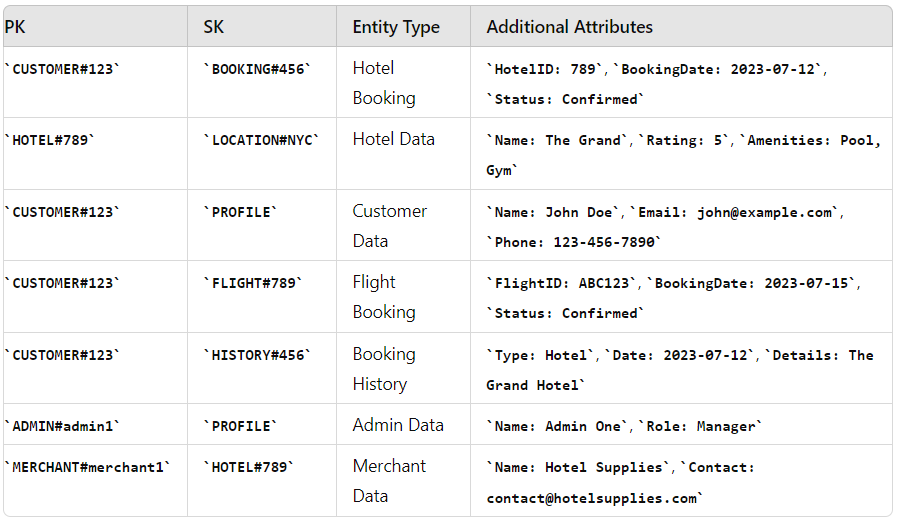
In this example, it is shown how to store data using a partition key in a single DynamoDB table for a complex system and retrieve it quickly.
You can see that there are various types of data here. If it were a traditional SQL table, you would need to use numerous tables and joins to query different types of data.
For instance, to get a user’s booking data, you would need to join the booking table and the user table. However, here, with a single query, we can retrieve both the customer’s data and their booking information.
Proper partitioning has been used to store hotel data, customer data, and booking data, ensuring that even when many customers make bookings simultaneously, the data is stored in separate partitions, and DynamoDB can still retrieve it within single-digit milliseconds.
Example Access Points:
Hotel Booking: Partition Key (PK) = CUSTOMER#123, Sort Key (SK) = BOOKING#456
- Efficiently retrieves all hotel bookings for customer 123: PK = ‘CUSTOMER#123’ AND begins_with(SK, ‘BOOKING#’)
Hotel Data: Partition Key (PK) = HOTEL#789, Sort Key (SK) = LOCATION#NYC
- Retrieves details for hotel 789 located in NYC: PK = ‘HOTEL#789’ AND SK = ‘ LOCATION#NYC’
Customer Data: Partition Key (PK) = CUSTOMER#123, Sort Key (SK) = PROFILE
- Retrieves profile information for customer 123: PK = ‘CUSTOMER#123’ AND SK = ‘PROFILE’
Partition Key Strategies to Support Easy Expansion
By selecting a proper partition key at the outset, you create a scalable, flexible, and efficient data model that supports the seamless addition of new products or features. Adding a new product involves significant schema changes, complex joins, and potential downtime for migrations.
Adding a new product is straightforward with no need for schema changes or downtime. You can efficiently store and query new entities using flexible partition and sort keys, ensuring scalability and performance.
Adding a New Product (Tour) to the previous system example
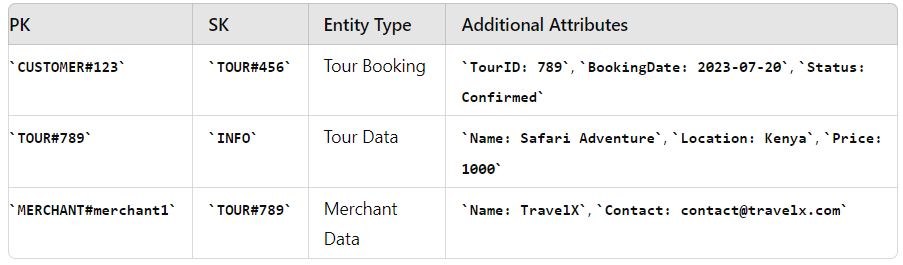
To add a new product, such as “Tour”, the existing partition key design supports the extension without needing a major overhaul
How the Initial Partition Key Design Helps
Consistency:
Uniform Structure: The existing structure (using composite keys) accommodates new entity types seamlessly. For example, adding TOUR# entries align with existing data access patterns.
Example Query: To fetch all tour bookings for a customer
Scalability:
Horizontal Scaling: DynamoDB automatically allocates partitions as new data types are added, ensuring consistent performance.
Example: Adding a large number of tour bookings distributes evenly across partitions.
Flexibility:
Adapting New Entities: Easily add new types of entities like tours without needing to modify the schema significantly.
Example: Store additional attributes for tours within the same table, e.g.,
Performance:
Optimized Queries: New entities can be queried using the same efficient methods designed for existing data.
Example: Fetch all information related to a specific tour:
By following the best practices for partition keys and leveraging DynamoDB’s flexible schema, you can easily extend your application to include new products and features without the overhead and complexity of traditional SQL databases.
Benefits of Proper Partitioning and Access Points
Scalability: Proper partitioning allows DynamoDB to scale horizontally by distributing data across multiple partitions. This supports growing data volumes and varying access patterns.
Performance: Efficient access points (PK and SK combinations) enable fast and predictable query performance. By selecting appropriate keys, you optimize data retrieval operations.
Cost Efficiency: Well-designed partition keys prevent hot partitions and ensure balanced data distribution. This optimizes DynamoDB’s capacity usage and helps manage costs effectively.
Conclusion
We all know DynamoDB offers high performance and scalability. However, high performance can only be achieved through efficient design. Understanding how DynamoDB partitions data is crucial for designing scalable and high-performing applications. Proper partitioning is the key to get the fullest of DynamoDB.
When designing a single table, selecting an appropriate partition key is paramount. It should distribute workload evenly and support your application’s access patterns. Carefully consider how your data will be queried to choose the best partition key.

17/12/2024



.png?width=110&height=79&name=glassdoor%20(1).png)