


In the current dynamic world of software development, we learn to collaborate together. As technology is evolving, we are also inheriting new methods and types of cooperation with the team. Nowadays our softwares is evolving rapidly depending on the necessity and is getting more scalable. More developers are working on single projects and contributions are also becoming more versatile.
In this large scale development process and versatile contribution git is playing a crucial role as a version control system(VCS). Developers have to maintain a lot of branches and codes with the help of VCS or git. Maintaining a lot of branches, collaborations and other complex stuff, losing some work can be a developers worst nightmare. This kind of unexpected mishap can lead the team to significant setbacks. Imagine committing major changes to the wrong branch, accidentally resetting your branch or even deleting an entire branch with important code changes. In this kind of scenario, git reflog comes to the rescue. Whether you are a seasoned developer or any beginner, learning to navigate through git reflog can save you from this type of disaster situation.
What is Git ?
Let’s get familiar with git a little. Git is a famous Distributed Version Control System (DVCS) tool. It supports developers to collaborate code from multiple sources and helps to maintain a large code base with different features.
Git was initially created by Linus Torvalds in 2005. In the modern software industry git plays a crucial role that knowledge of git is a must for every developer.
Git maintains its data by having some series of snapshots of a miniature file system. At any moment git tracks any changes made to the file system by commit or file save, it takes an image of files and keeps a reference to that image or snapshot by generating some string. If there’s no change of file, git does not store them again. This way git can track changes more efficiently than other version control systems.
What is Reflog
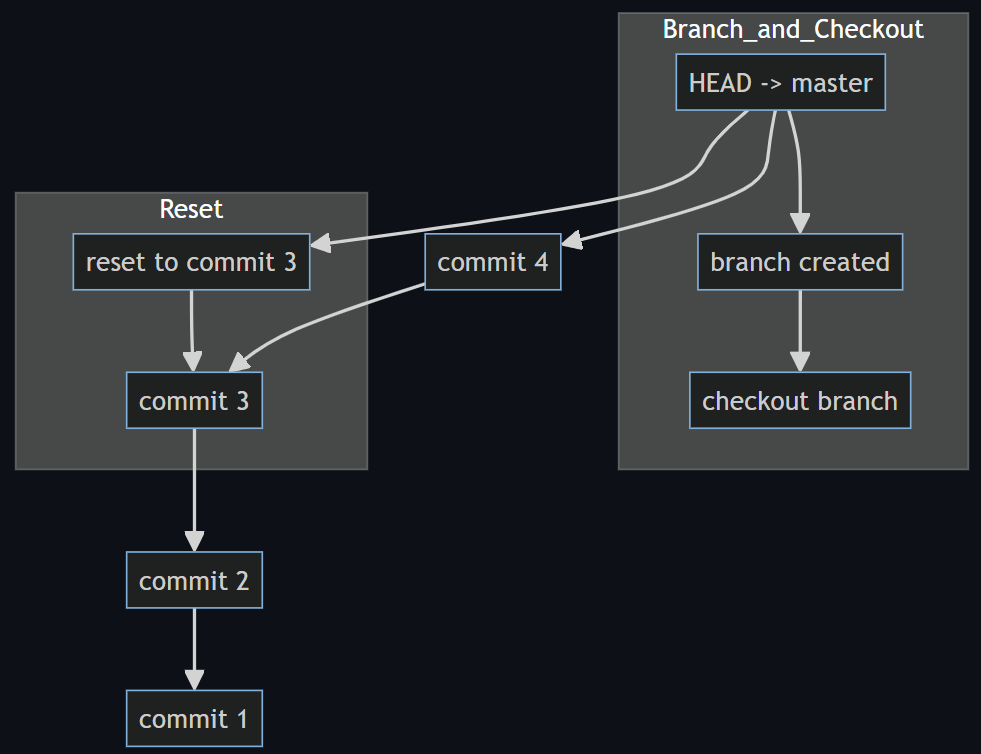
Figure 1: Reflog records all effective activities
Every activity done on git can be tracked with its logging system. Git reference log or reflog is a kind of logging system where git tracks tips of branches and other references were updated in the local repository. If any changes are implemented into any branch it keeps track of that step by step with a snapshot. It actually tracks all kind of movements of changes to the HEAD. It is a powerful yet often underutilized feature in git.
Each entry in the reflog is a snapshot of the repository at that point and moment. Every log message includes an identifier, a message of activity and time of that activity.
Understanding Git Reflog
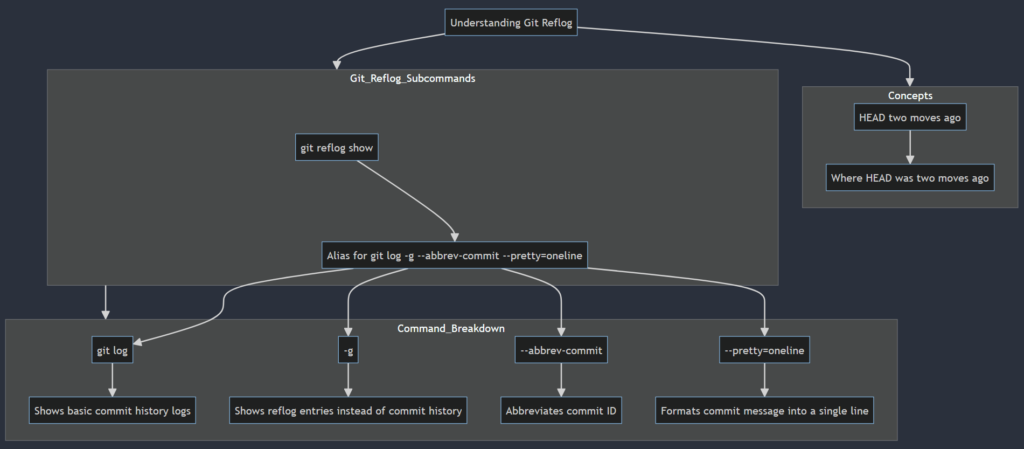
Figure 2: A breakdown of the working process
Let’s dive into reflog message patterns a little. Let’s think of a message like HEAD@ {2} which means ‘where HEAD used to be two moves ago’.
Git reflog has many subcommands. One of them is ‘show’ which is used to show the logs. The full command is git reflog show. Actually this command is an alias for git log -g –abbrev-commit –pretty=oneline.
Let’s break this command for better understanding-
git log: Shows the basic commit history logs for git.
-g: Is used to tell git to show the reflog entries instead of showing commit history.
–abbrev-commit: This command abbreviates the commit ID into a shorter length. Generally it shows a few characters from the beginning of the full SHA-1 hash string in order to make the output more concise.
–pretty=oneline: This instructs the commit message to format in a way so that it can be displayed into a single line so that it becomes easy to read.
Let’s go through some reflog messages to understand them. I have made some changes to my existing dummy git repository to show some reflog messages and what they actually mean.

- From the first line, it means the rebase operation has finished and the HEAD returned to the main branch which now points to commit ‘da8234d’.
- The second line indicates that rebase operation started at this point which is checking out commit ‘97227b7’ as the base of this rebase process.
- On the third line, git pull command was executed, which moved the HEAD to commit ‘663f884’ from the main branch.
And like this reflog provides every action implemented to the head or branches. I think you got the main idea.
Some Key Points of reflog
- Reflog data is stored only on local machines and does not get pushed to remote repositories.
- By default reflog reflog data expires after 90 days. This time can be changed if necessary.
- You can manually clean reflog with the command:
git reflog expire –expire=now –all
Recover a Deleted Branch
Let’s see how many branches I have in my repository with the command git branch.

Now let’s delete the branch hotfix#11 with the command git branch -d hotfix#11.
Now the git branch command shows branches as follows.

Now if we see our reflog output with the command git reflog show

As we can see from the highlighted log, id ‘da8234d’ with the HEAD pointer HEAD@{5} is the one which indicates the creation of the branch ‘hotfix#11’. Which means this HEAD contains the exact snapshot at that moment and we can retrieve our branch from that snapshot.
To recover the deleted branch we can use the following command:
git checkout -b hotfix#11 HEAD@{5}
And magically we got back our deleted branch as exactly as it was by the time of creation with all its resources.

Let’s try to break down the command.
git checkout: generally this command is used to Switch branches or restore working tree files.
-b hotfix#11: This indicates the creation of a new branch with the name hotfix#11. With the checkout command it indicates that, create a new branch and move into that branch.
HEAD@{5}: This refers to the commit state as it was 5 steps ago in reflog.
Files Restored During the Process
During the whole process the file stashed and saved in the stashed index list will be restored. If you had any untracked file in your repository, they won’t be restored. You won’t find them here. So, always try to commit your file changes or use the git stash feature to stash them.
Recover Lost Commit
Now, imagine a case where you have deleted some important commits and now you want them back. Git reflog can also help to restore them as well. Let’s see how.
Let’s show existing commits with the command git log –oneline
My current commits are
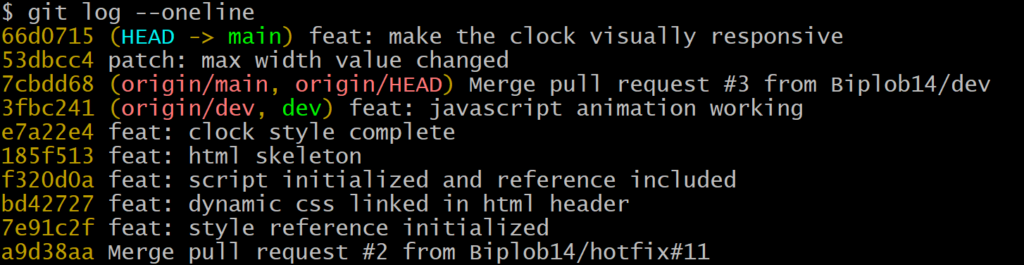
Let’s use the reset command to move HEAD to that commit with its hash value.
This can be achieved with the command git reset –hard 53dbcc4.
After resetting commits are as follows
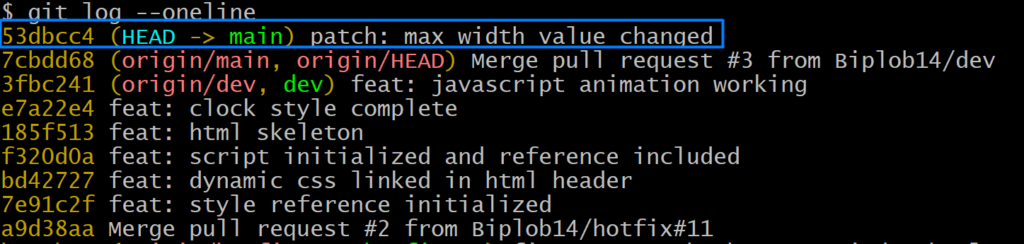
That means we have deleted our last commit. Now let’s try to retrieve the deleted commit.
Let’s see the current reflog state.

We found our deleted commit details from reflog. Now we can move the HEAD back to our lost deleted commit and retrieve commit details.
Lets try the command git reset –hard HEAD@{1} in this case to retrieve our commit.
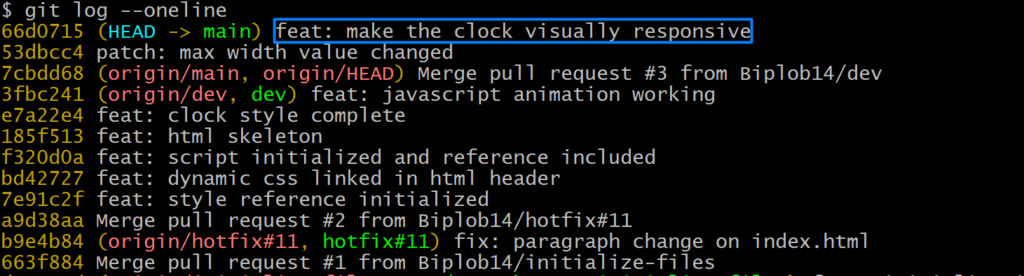
We found our lost commit back and HEAD is directed to that commit. We could have used the encrypted sha string instead of HEAD@{1} to get back to the commit.
Advanced Usage of Git Reflog
Beyond recovering lost commits and branches, reflog can be used in many other ways. It can be used to do some advanced works like:
- Finding Orphan Comments: Orphan commits means all those commits in your local repository that are not accessible by any reference like branch, tag or HEAD. You can also find those commits with reflog.
- Reverting to Previous State: You can revert your repository into any previous state by using HEAD position shown on reflog.
- Analyze Repository History: Reflog provides detailed information about repository history. This information can be used to analyze activity, audit changes or any kind of debugging cases.
Beyond Git Reflog
Now let’s get into another case. Suppose you lost your reflog or you can’t identify your lost data with log messages. In this scenario git fsck can be your savior. Git fsck stands for “file system check. This feature helps to check health status in a git repo.
Let’s understand the fsck command a little. Fsck can help to check the integrity of the repository and find if any issue exists in the repository. Like if your repository get corrupted or you have some corrupted file fsck will help you to find them.
Find Lost Work With Fsck
When you run git fsck it will show any object that is unreachable from the current references like tag, branch etc. These unreachable objects may contain different commits, blobs, trees etc that are no longer attached to any other repository or tag.
The command git fsck –full may show them as follows

git show <unreachable-commit-hash> command can be used to identify if it contains the lost work.
There is another way, you can use the command git fsck –lost-found which will create a folder called “lost-found”. Inside there we will get another folder named “other”. So the directory will be “.git/lost-found/other/” where we may get some SHA-1 hashes. If we want to show what changes those hashes contain we can use the above git show command with the hash. We finally can restore them by creating another branch with the hash.
Best Practices For Using Git Reflog
To get the most out of reflog or entire git repository you may maintain following instructions:
- Keep regular backup: Keep regular backups of your activity to remote repository can save you in many cases.
- Understand Your Commands: Be familiar with git commands and use cases for proper implication. Understanding every part of the command before implementing those.
- Document Important Changes: In different cases developers may do some unusual changes. You can keep any change log or documentation by mentioning those changes.
- Commit Message: Always use descriptive and clean commit messages so that the message can easily express changes implemented on that specific commit.
- Clean Reflog Regular: Try to clean up old reflog messages in order to maintain manageable history. You can set an automatic retention time for that. Default time is set for 90 days.
Conclusion
Mostly there is some backup option on git whatever we change or make mistakes. Despite this, we always should maintain standard practices. Version control system is a critical aspect of the modern software development industry. Often git’s complexity can lead to some challenging situations. However tools like git reflog or fsck can provide a safety net to recover mistakenly lost works and maintain productivity.

29/01/2025



.png?width=110&height=79&name=glassdoor%20(1).png)