

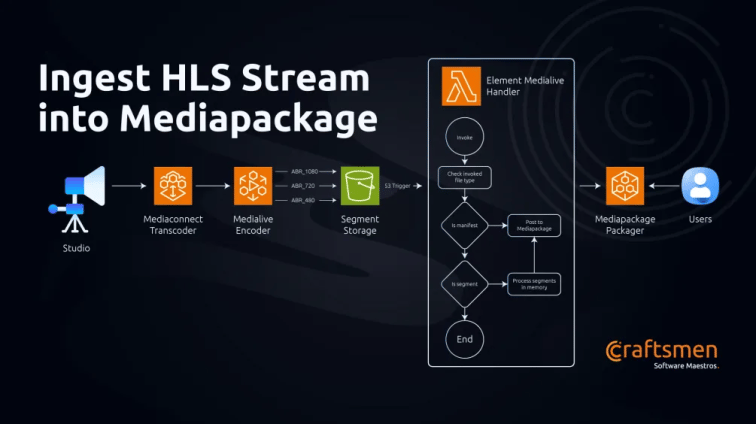
Elemental Mediaconnect -> Elemental Medialive -> Elemental Mediapackage
We’ve all seen this workflow before. A tried and tested broadcasting workflow on the AWS cloud. And to be honest, the services work very well together. Recently on a project we’re working on needed something between the encoder(Medialive) and the packager(Mediapackage) to process segmented video clips before sending it on its way to mediapackage. A simple enough architecture.
Medialive can put files into an S3 bucket which as you can see here is being used to trigger a Lambda that does the processing and sending it to Mediapackage.
Mediapackage provides you with an HLS ingest endpoint to push your encoded streams to. But we’ve noticed the documentation not mentioning how the stream files need to be sent to the endpoints (more here). Note that the ingest server is a webDav server which works great for storing files.
We tried making PUT requests to the endpoint with the manifest and transport stream as the payload. Strangely enough, we were getting 201 from the server but Mediapackage was logging a 401 for every file that we sent despite responding with a 201 externally. And when we try to fetch the packaged manifest, we keep getting a 404 back from Mediapackage origin endpoint.
We couldn’t find any documentation on the expected file name structure that Mediapackage requires in order to do its Just in Time packaging. Hence this article to help anyone trying to do the same.
We were using Python as the runtime for our Lambda function. The following url is an example Mediapackage ingest endpoint.
https://some_id.mediapackage.some_region.amazonaws.com/in/v2/some_id/some_id/channel
Here’s the function that rewrites our url:



.png?width=110&height=79&name=glassdoor%20(1).png)